Reading drawings was only half the job. The half my fabricator friend really cared about was the next step: "If it can read last year's exchanger, can it give me a slightly different one?"
Most of his new orders are close cousins of old ones. Same TEMA type, a slightly higher design pressure, a longer shell, two more baffles, a new customer in the title block. Today each cousin is redrawn in CAD by a skilled draughtsperson, and skilled draughtspeople are not easy to find.
When people hear "AI" and "new drawing" in the same sentence, they imagine a model that draws. You describe an exchanger and out comes a fabrication drawing. It's a lovely demo, and I'd be very nervous signing anything it produced.
We went the other way.
The new drawing is the old drawing, edited with care
In RevE, a new design starts from an existing drawing that has already been read and reviewed: the template. A simple ten-step wizard walks the user through what might change: drawing and title block, design data, shell and front head, tube bundle, nozzles, finish and spacing. Every box starts with the template's own value, so the user changes only what is different. Changed boxes are highlighted, and one click puts the original value back.

Then RevE does something deliberately unglamorous. It doesn't redraw the sheet. It takes the template PDF itself and edits it in place:
- It finds exactly where each changed value is printed, from the text layer where one exists, or by grouping drawn shapes into letters where the drawing is all curves.
- It removes only the old characters inside that value's box.
- It writes the new value using the drawing's own lettering, copying the strokes of the template's own digits, so the new number looks as if the original draughtsman wrote it.
- Pressures keep the template's units and decimals. Materials keep the template's style of writing.
There is no AI call anywhere in that flow.
The results are the kind that make engineers relax. Outside the edited places, the new sheet is identical to the template, pixel for pixel. Every new value reads back correctly when we check it with OCR. When we export to AutoCAD's DXF format and compare, 99.5 to 100 percent of the drawing's ink is there.
"What changed?" is the question every checker asks
I asked a draughtsperson how they would check someone else's revision. The answer was immediate: "Show me exactly what changed, where, and from what to what."
So RevE produces a What changed list in plain words. Each line shows where on the drawing the change is, what it is, the old and new values, a before-and-after picture of that exact spot, and how it changed: "you typed it" or "follows from your change". There's also a review copy of the drawing with every change marked in blue, and the same list as an Excel file for the record.

Rules, not AI, for the knock-on effects
Change one thing on an exchanger and other things follow. Add tubes, and the tube-layout circle grows, the shell might need the next pipe size, baffles change and tie-rod minimums change.
This felt like a natural place for AI ("let the model suggest what else should change"), and we decided against it. The "Also affected by your changes" panel uses fixed formulas, published TEMA tables and the template's own proportions. Every suggestion names the rule it came from. The panel says plainly that these are quick checks, not a certified design calculation.
A suggestion an engineer can't trace is a suggestion an engineer will ignore. A suggestion with its rule beside it is one they can accept, reject or argue with.
Changing the tube pattern, everywhere at once
The first version of the wizard changed values: a pressure, a length, a count. Engineers soon asked for something harder: "Can I switch this bundle from triangular to square pitch?"
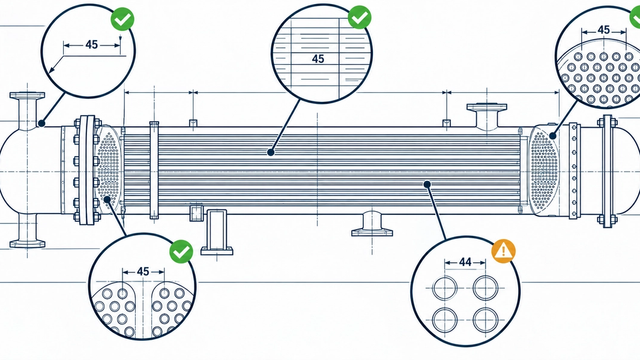
That's not one value. It changes the hole layout in every tubesheet and baffle view, the small pitch sketch, the notes beside the views, the elevation note and sometimes the size of the layout circle. So the tube pattern became a proper design choice in the wizard, with the four TEMA patterns (30°, 60°, 90° and 45°). The holes are recalculated, a live picture shows the old layout beside the new one, and RevE warns when a square pattern leaves a cleaning lane narrower than TEMA allows.
On the drawing itself, the old holes are removed, not painted over. More on why in Part 3. The new holes are drawn in their place, the pitch sketch is redrawn with the right number of holes and angle, and notes drawn as lettering shapes are rewritten word by word. Even the old "44 NOS. … AT TRIANGULAR PITCH" note beside a hole view becomes "45 NOS. … AT SQUARE PITCH". On our test design, every place on the sheet agreed afterwards: 45 holes in five places, square in nine.
Spelling corrections travel too. Once an engineer accepts that TRIAGULAR should be TRIANGULAR, every new drawing made from that template carries the correction, and each one can still be unticked place by place.
Clean lines for AutoCAD
There was a less glamorous problem waiting at the very end of the chain.
The DXF files RevE produced opened in AutoCAD and looked right. But when my friend tried to select a dashed centre line, he got a short dash. The next click got the next dash. PDF drawings store dashed and dotted lines as hundreds of separate pieces, and a faithful conversion keeps every piece. One drawing arrived with 70 to 90 home-made line types and more than 31,000 separate objects.

RevE now joins those pieces back into whole lines with AutoCAD's own standard CENTER, HIDDEN and DOT line types. That drawing fell from 31,455 objects to 9,242, another from 10,295 to 2,748, and nothing moved by more than 0.1 mm.
The bug that proved code isn't automatically right
Look again at row 5 in the screenshot. A user changed a nozzle flange material and typed "SA106" without a grade. The new drawing printed "SA 106 None".
The culprit wasn't the AI. It was a tiny formatting function in ordinary code, which turned an empty grade into the word "None" and wrote it onto the drawing.
I share this because it completes the lesson from Part 1. Code isn't automatically right either. The difference is that a code bug is deterministic. It fails the same way every time, a test can pin it down, and once fixed it stays fixed. We fixed it within minutes and added a check so it can't return. Try doing that with a model that's right 99 times and creative the 100th.
The best feature came from a casual remark
After generating a new drawing, the user opened it in RevE and said, almost in passing: "The new drawing created does not have the parts list or blocks."
The drawing file itself was complete. But in the app, a new design opened in a different view from a drawing the AI had read, without the blocks, parts list and parameters people had come to rely on.
The tempting fix was to run the AI reader over the new PDF. It would have cost money, taken minutes and risked introducing reading errors into a drawing we had just made ourselves.
Instead we did something simpler and better. The new drawing's reading is derived from the template's reading plus the exact list of changes. We know precisely what we changed, so we know precisely what the new drawing says. It's free, instant and exact. The next message from the user was: "Now I see all those for the newly generated drawing."

A library that grows with every job
That one remark opened the next door. If a new drawing has a full, exact reading, it can become a template itself. A second-generation design, made from a design, works without a single model call.

This is where I think the real value lies for a fabrication shop. Its most precious asset isn't any single drawing. It's the library of approved designs built up over years. Every job RevE helps produce becomes part of that library, already read, already checked and ready to be the starting point for the next enquiry.
Underneath this sits a parameter catalogue we built from the five original drawings: 217 regeneration parameters organised across 49 components, from the shell and channel down to tie rods and spacers. Each parameter knows whether it's an input, a selection, a value derived by formula or a table lookup, and which parts of the drawing it drives. That catalogue is what turns "a PDF" into "a design you can change".
What I'd tell anyone building a generator

1. Start from what's already approved. A template carries years of a shop's judgement. Don't throw it away to generate from scratch.
2. Edit exactly, and change nothing else. "Identical outside the edits" is a promise an engineer can check.
3. Show what changed, in plain words, with pictures. That's how real checkers work.
4. Use rules for consequences, and name the rule.
5. Don't ask AI questions you already know the answer to. We knew exactly what we'd changed, so we derived the reading instead of re-reading it.
The best AI feature in our generator turned out to be its restraint. RevE uses AI where perception is genuinely needed, and nowhere else. The result is a new drawing a shop can trust, at zero AI cost.
Next, in Part 5: what happens when the input isn't a drawing at all, but a pressure-vessel calculation report.
#EngineeringDesign #Fabrication #HeatExchangers #AutoCAD #DesignAutomation #IndustrialAI #Manufacturing #CAD #EngineeringDrawings #SandurTech
Disclaimer
This series introduces SandurTech RevE, a product in development for AI-assisted engineering drawing analysis and generation. Examples reflect our current capabilities and ongoing validation. Outputs should be reviewed by qualified engineers and verified against approved drawings, standards, and project requirements before use.